Pages

Thứ Ba, 5 tháng 3, 2013

Picasa Web Albums Redirects to Google+ Photos

After replacing Picasa Web with Google+ Photos in the navigation bar and redirecting individual albums to the Google+ interface, now Google redirects picasaweb.google.com to the albums section of Google+ Photos. You can still go back to the old Picasa Web interface if you use this URL: https://picasaweb.google.com/lh/myphotos?noredirect=1. Google displays this URL in a message that says: "Click here to go back to Picasa Web Albums".
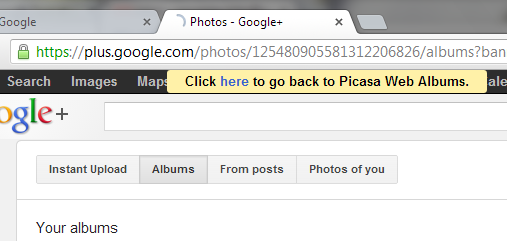

When you use that URL, Google also sets a cookie value that prevents the redirect to Google+ Photos even when you enter picasaweb.google.com in the address bar.

Google+ Photos has constantly improved last year, while Picasa Web Albums no longer added new features. It's obvious that Google+ Photos is an upgraded version of Picasa Web Albums, which will be discontinued in the future. There are still a lot of cool Picasa Web features that haven't been added to Google+ Photos (Creative Commons licensing, photo mapping, featured photos, search), so let's hope that Google won't retire Picasa Web Albums until Google+ Photos adds these features.

{ Thanks, Dave and Eric. }
»»  read more

Thứ Hai, 4 tháng 3, 2013

Gmail's Account Activity Reveals More Information

Gmail's account activity is a very useful security feature that offers information about the clients that connected to your email account recently, including the IP addresses and the date.

Until now, Google only displayed generic information about the access type (browser, mobile, POP3). A recent updated added some new details: the browser's name and the user agent. If you click "show details", you can find more information from the user agent: the browser's version and the operating system. Obviously, the browser's user agent can be easily spoofed.


{ Thanks, Herin. }
»»  read more

Change the Default Country Code in Gmail

Gmail has a new setting that lets you change the default country code for phone numbers. Google already detected the country, but you can now manually change it.


The default country code is used by Gmail's contact manager. If a phone number doesn't include a country code, Gmail uses the code you've selected.


{ Thanks, Scott and Herin. }
»»  read more

Chủ Nhật, 3 tháng 3, 2013

"Try These Too" in Google Image Search

Google Image Search has a new feature that shows a list of 7 related images when you select a result. The section is called "try these too" and is a clever way to integrate the similar images feature. Click one of the related images and it will replace the original result. The first image from the list is always the original search result, so you can always go back to that image.


If you want to find a more comprehensive list of similar images, click "more sizes", then click the "More sizes" dropdown and select "Visually similar".
»»  read more

Thứ Bảy, 2 tháng 3, 2013

Chrome for Android Travels in Time

Speaking of Chrome for Android, there's a milestone that needs to be mentioned: it's the first time when the latest stable version of Chrome for Android matches the desktop Chrome.

You've probably noticed that Chrome for Android has always been a few months behind the desktop Chrome and the delay has continually increased. Chrome 18, the previous stable version, corresponds to the desktop version released in March 2012. That's one year of performance improvements, bug fixes, new HTML5 features, new WebKit and V8 releases. It's like using a completely new browser or travelling in time and skipping 6 Chrome versions.


Chrome for Android has a great interface and cutting-edge syncing features, but it was slower than the stock browser, buggy and used a lot of resources. Google addressed some of these issues, so let's hope that Chrome for Android will start to push the boundaries when it comes to speed, without neglecting the constraints of the mobile devices.

"Chrome for Android has been developed in a separate repository as a fork, which means that most of the code will have to be upstreamed," mentioned Peter Beverloo last year, when Chrome for Android was launched. "Of course, bringing a browser to a different - much more limited - platform goes further than simply re-using code. Mobile devices have a lot of limitations compared to desktop and laptop machines. Besides the lower amount of available memory and CPU power, other constraints lie in less memory bandwidth and VRAM on the device's GPU. Google Chrome has a complicated architecture which imposed some interesting challenges here: separating the browser from the renderers through its multiple process architecture, to name an example. Decreased rendering and scrolling performance were also an issue."

{ Image licensed as Creative Commons Attribution by CityGypsy11. }
»»  read more

Chrome for Android to Add Web Accelerator

I've always wondered when the Google Web Accelerator project will be resurrected. Now that Google has both a mobile operating system and a browser, it makes sense to find better ways to speed up browsing. A fast browser is not very useful if you have a slow Internet connection or you're limited to a few hundred megabytes a month. That's why browsers like Opera Mini and Opera Mobile are popular. Amazon Silk for Kindle Fire even uses Google's SPDY to make browsing faster.

Chrome for Android will add an experimental feature that uses Google's servers to compress pages. The purpose is to "reduce data consumption by loading optimized web pages via Google proxy servers." For the moment, it's just another option added to the chrome://flags page. You'll probably find it in the next releases of Chrome Beta for Android.


{ via François }
»»  read more

Google's Mobile Image Search Adds Infinite Scrolling

I'm not sure if this is an experiment or a feature that's currently rolled out. Google Image Search for mobile has a new interface that replaces pagination with infinite scrolling, just like the desktop interface. You can see a lot more images without having to swipe and it's much easier to find great search results. Another difference is that thumbnails no longer have the same size.

Google also added an option to "scroll to top", but this is more useful if you use Android. iOS has a built-in feature that scrolls to the top of the page (or the current view) when you tap the status bar.


When you select an image result, you'll probably see a new interface that focuses on the image and makes it more obvious that you can swipe right/left to check to other results. The browser's address bar is no longer displayed and the image is slightly smaller.


Unfortunately, just like the new desktop image search, the redesigned mobile interface replaces snippets with page titles and removes file sizes (in bytes, not pixels). The most important missing feature is the link to the full-size image. The image is actually loaded in the background and replaces Google's thumbnail, so you can still long press the image and use browser features that let you save the image or open it in a new tab.

Here's the old interface:


And here's a side-by-side comparison (old vs new):

»»  read more